
Viofo OBD-II Constant Power Cable
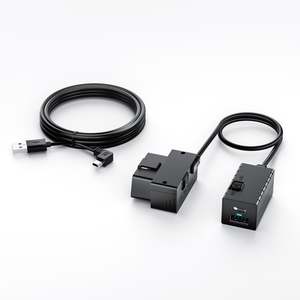
OP100 is designed to power the Viofo dashcam through the vehicle’s OBD-II port.
Why would I use an OBD power cable?
The OBD-II cable offers a DIY option for those who are confident in cabling their vehicle but uncertain when it comes to connecting it to their fuse panel. Please take note that some features of the HK6 hardwire kit aren't available in the OBD-II cable option.
We have also come across some vehicle make/models where using a hardwire kit is challenging as the vehicle make/model does not have the necessary available switched and constant fuse available in the interior but elsewhere.
In the past the work around for this challenge was the 12V power plug cable (that is included in your dashcam box) that would provide power to the dashcam when your engine was on but as it is a 'switched fuse' once the engine was off there was no power to the dashcam and consequently no parking recording.
The OBD-II cable offers an alternative to the 12V power plug (cigarette lighter plug) by enabling you to plug into your vehicle's OBD-II power port which is a source of constant power i.e. when the engine is off the dashcam can still get power so parking mode can be used.
Will it drain my battery? Like a hardwire kit, the low voltage protection will protect your vehicle battery by shutting down within 90 seconds if it detects the battery voltage is less than 12V/24V, preventing damage to the car battery and ensuring the car can restart normally.
Note: Activates when input is below 12V/24V. Alternatively if you prefer more flexibility opt for a hardwire kit that enables you to choose your 'cut off voltage' at either 11.8V, 12.0V, 12.2V, 12.4V.
Installation
Simply plug the constant power cable into the vehicle's OBD-II port and connect it to your VIOFO dash cam. Your dash cam can receive constant power, even when your vehicle is off.
This cable offers a more discreet option for dash cam wiring than the cigarette lighter, ensuring a neat and tidy interior without messy cables visible on the surface.
Note: like the hardwire kit, the power cable will need to travel through areas in your vehicle that may have airbags present. If you are unsure on how to install your power cable safely, please seek the assistance of a professional installer.
Note: The location of the OBD-II port in a vehicle can vary slightly depending on the vehicle's make and model. See your vehicle owner's manuals for more information.
Which OBD-II Power Cable Type should I select?
We choose to supply our OBD-II power cable including the upgrade of the parking mode cable.
Why? Because the parking mode cable provides a stable power supply for your dash cam and automatically activates Parking Mode when the engine is turned off, ensuring continuous protection while your vehicle is parked.
There are two types of cables to choose from either Type-C or Mini USB. Please refer to the compatibility information below.
Type-C compatible with:
- A329S Series
- A229 Series
- A119M Pro
- A119 Mini 2
- VS1
Note: the OBD-II power cable does not include some features found in the HK6 hardwire kit.
Mini-USB compatible with:
- A129 Plus
- A119 V3
- A129 Pro
Parking Recording Time Switch
The time switch, offering three options (3h/24h/∞), controls the OBD power supply duration after the dashcam enters parking mode. When the time expires, it will automatically cut off the power.
Note: ∞ indicates that it provides continuous power supply. If you prefer you can use this ∞ option combined with the low voltage protection to cut power to the dashcam when battery voltage is detected to be lower than your chosen threshold e.g. 12V/24V.
Dual Output Ports
OP100 comes with two output ports, one that is prioritized for powering the dashcam, the extra Type-C port is a huge bonus to power a mobile device.
Adjustable Power Switch
The ON/OFF switch enables easy control of the dashcam's power supply, saving energy and preventing vehicle battery damage.
Note: This is a fail safe if you don't require parking recording and your car will be static for a lengthy time you can opt to switch off the dashcam power source. However you can opt to switch off parking recording via the Viofo App
Does the OP100 interfere with my car's onboard computer (ECU)?
No, the VIOFO OP100 is designed as a Power-Only device. Unlike OBD scanners that read vehicle data via the CAN Bu
- Store:
- DriverCam New Zealand
- Price:
- $125