
iPhone X/XS Replacement Battery Adhesive
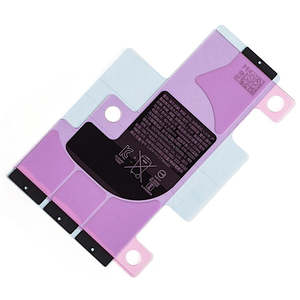
- Brand New
- Replace adhesive that holds your battery in place
- Precut to fit your battery perfectly
- Includes pull tabs to assist with future removal
If you have removed or replaced your battery, you will need a new adhesive strip so that you can stick the battery down to the rear case.
The adhesive is pre-cut and is the same size as the original for a perfect fit Please Note
This is a one-use product. If you remove this adhesive, you will need to replace it Specifications
- Type: Precut adhesive
- Warranty: 12 Months How do I find my Model number? Compatible Model Numbers iPhone X Model Number (A Number)
- A1865
- A1901
- A1902 How do I find my Mode number? iPhone X Model Numbers Model Identifier
- iPhone10,3
- iPhone10,6 EMC Number
- EMC 3161
- EMC 3175
- EMC 3176 Device Number (M Number)
- MQA52
- MQA62
- MQA82
- MQA92
- MQAC2
- MQAD2
- MQAF2
- MQAG2
- MQAJ2
- MQAK2
- MQAM2
- MQAN2
- MQAQ2
- MQAR2
- MQAU2
- MQAV2
- MQAX2
- MQAY2
- MQC12
- MQC22
- MQCK2
- MQCL2
- MQCN2
- MQCP2
- MQCR2
- MQCT2
- MQCV2
- MQCW2 Please note, to make searching the device number (M Number) easier, we have only listed the part numbers (First 5 characters), we have removed the region numbers as there is no difference in parts. For example, if "M Number" is "MC922LL/A". we remove the "region" portion and everything after (the "LL/A" at the end) leaving us with "MC922". More info Less info iPhone XS Model Number (A Number)
- A1920
- A2097
- A2098
- A2100 How do I find my Mode number? iPhone XS Model Numbers Model Identifier
- iPhone11,2 EMC Number
- EMC 3218
- EMC 3232
- EMC 3233
- EMC 3262 Device Number (M Number)
- MT8J2
- MT8K2
- MT8L2
- MT8M2
- MT8N2
- MT8P2
- MT8Q2
- MT8R2
- MT8T2
- MT8U2
- MT8V2
- MT8W2
- MT8X2
- MT8Y2
- MT902
- MT912
- MT922
- MT932
- MT942
- MT952
- MT962
- MT972
- MT982
- MT992
- MT9A2
- MT9C2
- MT9D2
- MT9E2
- MT9F2
- MT9G2
- MT9H2
- MT9J2
- MT9K2
- MT9L2
- MT9M2
- MT9N2
- MT9P2
- MT9Q2
- MT9R2
- MT9T2
- MT9U2
- MT9V2
- MT9W2
- MT9X2
- MT9Y2
- MTA02
- MTA12
- MTA22
- MTA72
- MTA82
- MTA92
- MTAA2
- MTAD2
- MTAF2
- MTAG2
- MTAH2
- MTAJ2
- MTAL2
- MTAN2
- MTAQ2
- MTAR2
- MTAU2
- MTAV2
- MTAW2
- MTAX2
- MTAY2
- MTE02
- MTE12
- MTE22
- MTE32
- MTE42
- MTE52 Please note, to make searching the device number (M Number) easier, we have only listed the part numbers (First 5 characters), we have removed the region numbers as there is no difference in parts. For example, if "M Number" is "MC922LL/A". we remove the "region" portion and everything after (the "LL/A" at the end) leaving us with "MC922". More info Less info Installation Help
Watch the video above or checkout the step-by-step guide below as they contain removal of the battery adhesive
iFixit iPhone XS Battery Replacement Guide
Here is some tools you may need to help you complete the repair.
- Phillips #000 Screwdriver
- P2 Pentalobe Screwdriver
- Y000 Triwing tri-point Screwdriver
- iSclack opening tool
- Suction Cup
- Fine Tipped Curved Tweezers
- iGadget 5 piece opening picks
- Black Spudger
- uFix iOpener Heat bag
- iHold Evo Screen Holder
Here are some helpful tips to assist you in completing a safe repair on your device. If you are unsure of something or have any quesions, please feel free to either by phone (0508 IGADGET) or by email
- Always track your screws to avoid putting back in the wrong place and damaging your device. You can draw a picture of your phone and tape the screws to the right places or use a screw mat
- Always power down your device prior to working on it
- Make sure you always unplug the battery before attemping any component removal
- Before removing your battery, discharge the battery to below 25%. A charged lithium-ion battery can catch fire or explode if punctured or damaged
- Removing the old battery adhesive can be frustra