
iPhone XS Max Top Earpiece Speaker Replacement
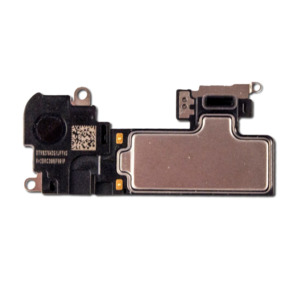
- Replacement top earpiece speaker for iPhone XS Max
- Allows you to fix your top speaker without losing Face ID functions
- Compatible with iPhone XS Max (6.5") A1921, A2101, A2102 & A2104
- Suitable replacement if your earpiece speaker is not working, is very quiet or water logged
Replace a malfunctioning earpiece speaker and fix problems with phone call audio on your iPhone XS Max
Replacing the speaker only on the speaker flex cable allows you to keep the Face ID functions as they are paired between the logicboard and sensor flex cable
Part includes:
- Top earpiece speaker
- Soldering Contacts
- 12 Month Warranty
Please Note
This part requires soldering skills Please Note
This part is for the speaker only, it does not include the flex cable Specifications
- Type: Earpiece speaker
- Connection Type: Solder
- Warranty: 12 Months How do I find my Model number? Compatible Model Numbers iPhone XS Max Model Number (A Number)
- A1921
- A2101
- A2102
- A2104 How do I find my Model number? iPhone XS Max Model Numbers Model Identifier
- iPhone11,6 EMC Number
- EMC 3219
- EMC 3234
- EMC 3235
- EMC 3261 Device Number (M Number)
- 3D879
- 3D897
- MT502
- MT512
- MT522
- MT532
- MT542
- MT552
- MT562
- MT572
- MT582
- MT592
- MT5A2
- MT5C2
- MT5D2
- MT5E2
- MT5F2
- MT5G2
- MT5H2
- MT5J2
- MT5K2
- MT5L2
- MT5M2
- MT5N2
- MT5P2
- MT5Q2
- MT5R2
- MT5T2
- MT5U2
- MT5V2
- MT5W2
- MT5X2
- MT5Y2
- MT602
- MT612
- MT622
- MT632
- MT642
- MT652
- MT662
- MT672
- MT682
- MT692
- MT6A2
- MT6C2
- MT6D2
- MT6E2
- MT6F2
- MT6G2
- MT6H2
- MT6J2
- MT6K2
- MT6L2
- MT6M2
- MT6N2
- MT6P2
- MT6Q2
- MT6R2
- MT6T2
- MT6U2
- MT6V2
- MT6W2
- MT6X2
- MT6Y2
- MT702
- MT712
- MT722
- MT732
- MT742
- MT752
- MT772
- MT782
- MT792 Please note, to make searching the device number (M Number) easier, we have only listed the part numbers (First 5 characters), we have removed the region numbers as there is no difference in parts. For example, if "M Number" is "MC922LL/A". we remove the "region" portion and everything after (the "LL/A" at the end) leaving us with "MC922". More info Less info Installation Help
Watch the video above or checkout the step-by-step guide below as they contain removal of the battery adhesive
Here is some tools you may need to help you complete the repair.
- Phillips #000 Screwdriver
- P2 Pentalobe Screwdriver
- Y000 Triwing tri-point Screwdriver
- iSclack opening tool
- Suction Cup
- Fine Tipped Curved Tweezers
- iGadget 5 piece opening picks
- Black Spudger
- Soldering Iron
- uFix iOpener Heat bag
- iHold Evo Screen Holder
Here are some helpful tips to assist you in completing a safe repair on your device. If you are unsure of something or have any quesions, please feel free to either by phone (0508 IGADGET) or by email
- Always track your screws to avoid putting back in the wrong place and damaging your device. You can draw a picture of your phone and tape the screws to the right places or use a screw mat
- Always power down your device prior to working on it
- Make sure you always unplug the battery before attemping any component removald
- Some simple soldering is required to complete this repair What’s In The Box
- 1x iPhone XS Max Replacement Top Speaker