
iPhone 8 Back Cover Rear Housing Chassis with Frame Assembly
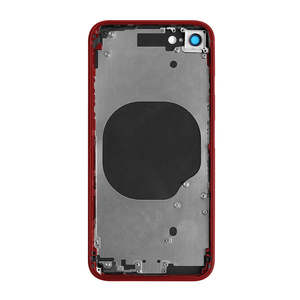
- Replacement rear cover chassis with back glass
- Part includes middle frame, side buttons, sim tray and back glass
- Perfect cost effective replacement for smashed back glass
- Compatible with iPhone 8 models; A1863, A1905, A1906 & A1907
If your frame housing is damaged or you have smashed the back glass on your iPhone 8. you may need a chassis replacement. The rear glass is difficult to replace without the right tools and time. It is often easier to replace the whole middle frame
Part Includes:
- Back Coloured Glass
- Colour Camera frame and glass lens
- Perfect fit Chassis
- Replacement Volume and Power buttons
- Replacement Sim tray
FYI
All internal components apart from the items mentioned above need to be transferred from your old chassis Specifications
- Type: Rear Chassis
- Colours: Black, White, Gold and Red
- Warranty: 12 Months How do I find my Model number? Compatible Model Numbers iPhone 8 Model Number (A Number)
- A1863
- A1905
- A1906
- A1907 How do I find my Model number? iPhone 8 Model Numbers Model Identifier
- iPhone10,1
- iPhone10,4 EMC Number
- EMC 3159
- EMC 3171
- EMC 3172 Device Number (M Number)
- MQ6G2
- MQ6H2
- MQ6J2
- MQ6K2
- MQ6L2
- MQ6M2
- MQ6V2
- MQ6W2
- MQ6X2
- MQ6Y2
- MQ702
- MQ712
- MQ722
- MQ732
- MQ742
- MQ752
- MQ762
- MQ772
- MQ7C2
- MQ7D2
- MQ7E2
- MQ7F2
- MQ7G2
- MQ7H2
- MQ7Q2
- MQ7R2
- MQ7T2
- MQ7U2
- MQ7V2
- MQ7W2
- MQ7X2
- MQ7Y2
- MQ802
- MQ812
- MQ822
- MQ832
- MRRK2
- MRRL2
- MRRM2
- MRRN2
- MRRP2
- MRRQ2
- MRRR2
- MRRT2
- MRRU2
- MRRV2
- MRRW2
- MRRX2 Please note, to make searching the device number (M Number) easier, we have only listed the part numbers (First 5 characters), we have removed the region numbers as there is no difference in parts. For example, if "M Number" is "MC922LL/A". we remove the "region" portion and everything after (the "LL/A" at the end) leaving us with "MC922". More info Less info Installation Help
Check out the video above or step by step guide below for assistance in this repair
iFixit iPhone 8 Teardown
Here is some tools you may need to help you complete the repair.
- Phillips #000 Screwdriver
- P2 Pentalobe Screwdriver
- Y000 Triwing tri-point Screwdriver
- iSclack opening tool
- Suction Cup
- Fine Tipped Curved Tweezers
- iGadget 5 piece opening picks
- Black Spudger
- uFix iOpener Heat bag
- iHold Evo Screen Holder
Here are some helpful tips to assist you in completing a safe repair on your device. If you are unsure of something or have any quesions, please feel free to either by phone (0508 IGADGET) or by email
- Always track your screws to avoid putting back in the wrong place and damaging your device. You can draw a picture of your phone and tape the screws to the right places or use a screw mat
- Always power down your device prior to working on it
- Make sure you always unplug the battery before attemping any component removal
- The connector to the logicboard can be tricky to align correctly so it fits into place, we recommend taking a pencil and tracing the original charging port so you know exactly where it gets positioned and lining the new charger port within the pencil lines
- Don't forget to remove the sim tray when removing the logicboard What’s In The Box
- 1x iPhone 8 Replacement Chassis Rear Housing