
Macbook Air 11" A1370 LVDS LCD Flex Connection Cable with Left Hinge (2010-2011)
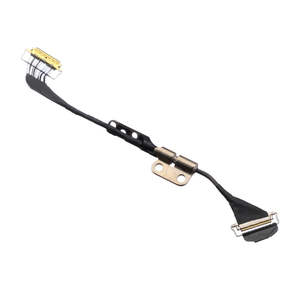
- Replacement LVDS LED LCD connection Cable
- Suits Macbook Air 11" A1370 (Late 2010-Mid 2011)
- 12 Month Warranty
Replace a damaged connector or torn LVDS display cable. Compatible with a model A1370 11" MacBook Air for 2010-2011 models.
The cable assembly includes one display hinge.
Part Includes:
- 1x Replacement LVDS LED LCD Conection Cable
- 12 Month Warranty
Please Note
This part will either be brand new or an A-Grade Used Genuine Apple replacement Specifications
- Part Type: LED Screen Flex cable
- Connection: FPC
- Warranty: 12 Months How do I find my Model number? Compatible Model Numbers MacBook Air 11" Mid 2011 Model Number (A Number)
- A1370 EMC Number
- EMC 2471 Macbook Air 11" 2011 How do I find my Model number? Model Identifier
- MacBookAir4,1 Device Number (M Number)
- MC968
- MC969 Please note, to make searching the device number (M Number) easier, we have only listed the part numbers (First 5 characters), we have removed the region numbers as there is no difference in parts. For example, if "M Number" is "MC922LL/A". we remove the "region" portion and everything after (the "LL/A" at the end) leaving us with "MC922". More info Less info MacBook Air 11" Late 2010 Model Number (A Number)
- A1370 EMC Number
- EMC 2393 Macbook Air 11" 2010 How do I find my Model number? Model Identifier
- MacBookAir3,1 Device Number (M Number)
- MC505
- MC506 Please note, to make searching the device number (M Number) easier, we have only listed the part numbers (First 5 characters), we have removed the region numbers as there is no difference in parts. For example, if "M Number" is "MC922LL/A". we remove the "region" portion and everything after (the "LL/A" at the end) leaving us with "MC922". More info Less info Installation Help
Here is some tools you may need to help you complete the repair.
- P5 Pentalobe Screwdriver
- T5 Torx Screwdriver
- T8 Torx Screwdriver
- Fine Tipped Curved Tweezers
- 5x iGadget Opening Triangle Picks
- Black Spudger
Here are some helpful tips to assist you in completing a safe repair on your device. If you are unsure of something or have any quesions, please feel free to either by phone (0508 IGADGET) or by email
- Always track your screws to avoid putting back in the wrong place and damaging your device. You can draw a picture of your laptop and tape the screws to the right places or use a screw mat
- Always power down your device prior to working on it
- Make sure you always unplug the battery before attemping any component removal
- We recommend that you turn autoboot off during this repair so that the screen doens't auotmatically turn on during removal What’s In The Box
- 1x A1370 Macbook Air 11" LCD flex cable replacement