
Macbook Pro 13" A1706 Battery Replacement for TouchBar Late 2016-2017 (Model A1819)
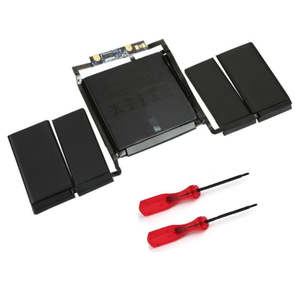
- Replacement Lithium Ion Battery
- 11.41V, 49.2Wh, 4310mAh
- Suits Macbook Pro 13" A1706 (Late 2016 & 2017)
- P/N: A1819
This MacBook Pro 13" (2016-2017) replacement battery is what you need to bring your dead laptop back to life!
Battery degradation is an inevitable part of your MacBook Pro's lifespan. If your laptop won't turn on, turns off suddenly, has a "service battery" warning, has had water damage or simply won't hold a charge, this replacement battery may be what you need to fix it.
Don't be let down by poor quality cheap aftermarket batteries. Our batteries have OEM components and cells with identical specs to the original which will ensure years of trouble free charging
Part Includes:
- Original Pure Colbalt Battery Cell
- OEM Safety chipsets and PCB board
- High Grade cabling and connectors
- 12 Month Warranty
Please Note
picture may vary slightly from actual product Specifications
- Compatible Part Numbers: A1819
- Voltage: 11.41V
- Watt Hours: 49.2Whr
- Capacity: 4310mAh
- Battery Type: Li-Polymer
- Warranty: 12 Months How do I find my Model number? Compatible Model Numbers MacBook Pro 13" 2017 Model Number (A Number)
- A1706 EMC Number
- EMC 3163 Macbook Pro 13" 2017 How do I find my Model number? Model Identifier
- MacBookPro14,2 Device Number (M Number)
- MPXV2
- MPXW2
- MPXX2
- MPXY2 Please note, to make searching the device number (M Number) easier, we have only listed the part numbers (First 5 characters), we have removed the region numbers as there is no difference in parts. For example, if "M Number" is "MC922LL/A". we remove the "region" portion and everything after (the "LL/A" at the end) leaving us with "MC922". More info Less info More info Less info MacBook Pro 13" 2016 Model Number (A Number)
- A1706 EMC Number
- EMC 3071 Macbook Pro 13" 2016 How do I find my Model number? Model Identifier
- MacBookPro13,2 Device Number (M Number)
- MLH12
- MLVP2
- MNQF2
- MNQG2 Please note, to make searching the device number (M Number) easier, we have only listed the part numbers (First 5 characters), we have removed the region numbers as there is no difference in parts. For example, if "M Number" is "MC922LL/A". we remove the "region" portion and everything after (the "LL/A" at the end) leaving us with "MC922". More info Less info More info Less info Installation Help
Watch the video above or checkout the step-by-step guide below for assistance in completing this repair
iFixit Macbook Pro 13" Battery Replacement Guide Remember
After completing your repair, calibrate your newly installed battery by charging it to 100% and then charging for a further two hours. Use your Macbook until it shuts off due to low battery, and finally, charge it uninterrupted to 100% again
Here is some tools you may need to help you complete the repair.
Please note: This battery comes with a simple toolkit, please check the "what's in the box" section for details
- T5 TorxScrewdriver
- P5 Pentalobe Screwdriver
- T3 Torx Screwdriver
- iSesamo opening tool
- 5x iGadget Plastic Triangle Opening Picks
- Fine Tipped Curved Tweezers
- Black Spudger
Here are some helpful tips to assist you in completing a safe repair on your device. If you are unsure of something or have any quesions, please feel free to either by phone (0508 IGADGET) or by email
- Always track your screws to avoid putting back in the wrong place and damaging your device. You can draw a picture of your phone and tape the screws to the right places or use a screw mat
- Always power down your device prior to working on it
- Make sure you always unplug the battery before attemping any component removal
- Before removing your battery, discharge the battery to below 25%. A charged lithium-ion battery can catch fire or explode if punctured or damaged
- If your newly installed battery is draining fast or shutting off randomly, first try the battery calibration steps found here, if that doesn't resolve it, try a PRAM and SMC reset Caution
If the new battery or the battery in your device is swollen or damaged during repair, take the proper precautions Note
You cannot dispose of old batteries in your general waste. Find recycling e-waste centres online or take to your local refuse station. What’s In The Box
- 1x Macbook Air 13" A1819 Replacement Battery
- 1x Instruction guide
- 1x Replacement connector cover t