
TP-Link Archer A6 (AC1200) Dual-Band WiFi 5 Gigabit Router
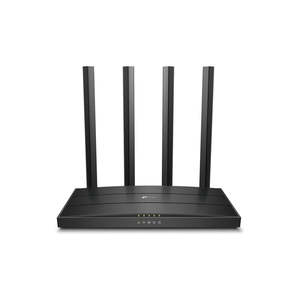
- AC1200 Dual-Band Wi-Fi - 867 Mbps at 5 GHz and 300 Mbps at 2.4 GHz band
- MU-MIMO Technology - Simultaneously transfers data to multiple devices for 2x faster performance
- Boosted Coverage - Four external antennas equipped with Beamforming technology extend and concentrate the Wi-Fi signals
- Access Point Mode -Supports AP Mode to transform your wired connection into wireless network
- Easy Setup - Set up your Wi-Fi in minutes with TP-Link Tether app.
AC1200 Wi-Fi Router MU-MIMO Gigabit
Archer A6
Smooth Entertainment with AC1200 Dual Band Wi-Fi
The Archer A6 creates a reliable and blazing-fast network powered by 802.11ac Wi-Fi technology. The 2.4GHz band delivers speeds up to 300Mbps, ready for everyday tasks like emailing and web browsing, while the 5GHz band delivers speeds up to 867Mbps, ideal for HD video streaming and lag-free online gaming.
Advanced Security with WPA3
The latest Wi-Fi security protocol, WPA3, brings new capabilities to improve cybersecurity in personal networks. More secure encryption in Wi-Fi password safety and enhanced protection against brute-force attacks combine to safeguard your home Wi-Fi.
Boosted Wi-Fi Coverage Throughout Your Home
Four external antennas send Wi-Fi signals to every corner of your home. Stay connected and enjoy fast Wi-Fi whether you are lounging on the sofa or on the balcony. Beamforming technology detects devices, even if they are far-away or low-powered, and concentrates wireless signal strength towards them.
MU-MIMO Brings More Simultaneous Connections
MU-MIMO lets the Archer A6 serve multiple devices at once. No more bandwidth congestion or latency. All devices get their data faster and Wi-Fi is used more efficiently!
Gigabit Connectivity, 10x Faster
With one Gigabit WAN port and four Gigabit LAN ports, speeds can be up to 10x faster than standard Ethernet connections. Connect your favorite wired devices to Archer A6 and get impressed!
TP-Link OneMesh™: Flexibly Create a Whole-Home Wi-Fi
OneMesh™ is a simple way to form a Mesh network with a single Wi-Fi name for seamless whole-home coverage. Just connect a OneMeshTM range extender to a OneMesh™ router. No more searching around for a stable connection.
Wi-Fi Dead-Zone Killer
Eliminate weak signal areas with Wi-Fi coverage for the whole house
Smart Roaming
Uninterrupted streaming when moving around your home
One Wi-Fi Name
No more switching Wi-Fi network names
Unified Management
Manage the whole-home Wi-Fi by managing the central node via Tether app/Web UI
It's An Access Point, Too
Switch the working mode of the Archer A6 to Access Point Mode to share your wired network with other wireless devices.
Easy Setup and Management with the Tether APP
The free Tether app is available for both Android and iOS devices, making it easy to set up the Archer A6 and manage your network settings.
Maximum wireless signal rates are the physical rates derived from IEEE Standard 802.11 specifications. Actual wireless data throughput and wireless coverage are not guaranteed and will vary as a result of 1) environmental factors, including building materials, physical objects, and obstacles, 2) network conditions, including local interference, volume and density of traffic, product location, network complexity, and network overhead, and 3) client limitations, including rated performance, location, connection, quality, and client condition.
Use of MU-MIMO requires clients to also support MU-MIMO.
WIRELESS Standards and Protocols Wi-Fi 5
IEEE 802.11ac/n/a 5 GHz
IEEE 802.11n/b/g 2.4 GHz WiFi Speeds AC1200
5 GHz: 867 Mbps (802.11ac)
2.4 GHz: 400 Mbps (802.11n) WiFi Range 3 Bedroom Houses 4× Fixed High-Performance Antennas
Multiple antennas form a signal-boosting array to cover more directions and large areas
Beamforming
Concentrates wireless signal strength towards clients to expand WiFi range
WiFi Capacity Medium Dual-Band
Allocate devices to different bands for optimal performance
MU-MIMO
Simultaneously communicates with multiple MU-MIMO clients
Airtime Fairness
Improves network efficiency by limiting excessive occupation Working Modes Router Mode
Access Poi