
Moza MFY Yoke
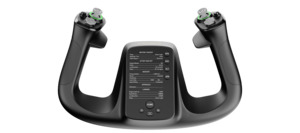
Experience the pinnacle of flight simulation with the MOZA MFY Yoke, engineered for precision, durability, and realism. Inspired by commercial aircraft yokes, the MFY features high-strength PA66 composite construction, a robust aluminum alloy quick-release system, and an ergonomic design for unparalleled comfort and control. With 34 configurable inputs, customizable RGB lighting, and multi-functional Hall effect joystick triggers, the MFY offers seamless adaptability for various flight functions, including Elevator/Pitch Trim, rudder control, autopilot disengagement, and camera navigation. The MFY also features a durable Hall effect joystick for precise, drift-free control and two customizable magnetic panels to optimize your cockpit layout.
SPECS MOZA MFY Yoke
- Dimensions: 142.5 × 202 × 313 mm
- Case Material: Composite materials
- Quick Release Material: Aluminum alloy
- Button Cap Material: ABS plastic
- Weight: 1.3 kg
- 8-Way Switches: 2
- Hall Effect Joysticks: 2
- LB/RB Buttons: 2
- Triggers: 2
- Total Signal Outputs: Supports up to 34 User Manual
MOZA MFY Yoke User Manual >Dimensions
MOZA MFY Yoke Dimensions >What’s in the Box
- MOZA MFY Yoke × 1
- Toolkit
- User Manual
- Warranty Card FAQs Which flight simulation games does the MFY Yoke support?
When connected to the MOZA AY210 Yoke Base, the MFY Yoke is compatible with leading flight simulation titles, including Microsoft Flight Simulator 2020/2024, X-Plane 11/12, DCS World, IL-2, War Thunder, and more. How does the MFY Yoke attach to the yoke base?
It uses an all-aluminum quick-release mechanism. Simply push and rotate to securely attach it to the MOZA AY210 Yoke Base—no tools required. Can the RGB lighting be customized or turned off?
Yes. Through the MOZA Cockpit software, users can fully customize lighting modes, colors, brightness, or choose to disable lighting completely. What kinds of inputs does the MFY Yoke support?
The MFY Yoke offers up to 34 configurable inputs, including buttons, triggers, hat switches, and dual joysticks. Inputs can be mapped as axes or button functions using MOZA Cockpit software. Can I use the MFY Yoke without the AY210 Base?
No. The MFY Yoke is designed to work exclusively with the MOZA AY210 Yoke Base for full and feedback support.accordion-btn background:#f5f5f5; cursor:pointer; padding:16px; width:100%; text-align:left; border:none; outline:none; font-size:16px; font-weight:bold; display:flex; justify-content:space-between; align-items:center; margin-bottom:4px; font-family: inherit;.accordion-btn.plus font-size:20px;.accordion-panel display:none; background:#fff; padding:16px; margin-bottom:8px; font-family: inherit; document.querySelectorAll(".accordion-btn").forEach(btn=>btn.addEventListener("click", ()=>const panel=btn.nextElementSibling; const plus=btn.querySelector(".plus"); if(panel.style.display==="block") panel.style.display="none"; plus.textContent=" "; else panel.style.display="block"; plus.textContent="–"; ); )