
APPLE PENCIL (USB-C) - GRADE 1
Please familiarize yourself with our grades in the link below, before purchasing:
https://talkischeap.co.nz/pages/grading-guide a text-decoration: none; color: #464feb; tr th, tr td border: 1px solid #e6e6e6; tr th background-color: #f5f5f5; Apple Pencil (USB‑C) – Key Features
- Precise digital writing and drawing – ideal for note‑taking, sketching, annotating documents, and marking up PDFs
- Pixel‑perfect precision – low latency and tilt sensitivity for natural handwriting and shading
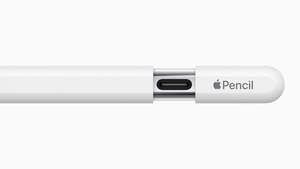
- USB‑C pairing and charging – pairs and charges using a USB‑C cable
- Magnetic attachment – magnetically attaches to the side of compatible iPads for secure storage
- Apple Pencil hover support – preview where your mark will land on supported iPad Pro models
- Simple, lightweight design – comfortable to use for extended writing or study sessions
- Optimised for productivity apps – works seamlessly with Apple Notes, Freeform, Microsoft apps, and popular note‑taking and drawing apps
- Great everyday option – well suited for students, professionals, and general iPad use
Compatible with most modern USB-C iPads:
- iPad Pro 13‑inch (M4, M5)
- iPad Pro 11‑inch (M4, M5)
- iPad Pro 12.9‑inch (3rd, 4th, 5th, and 6th generation)
- iPad Pro 11‑inch (1st, 2nd, 3rd, and 4th generation)
- iPad Air 13‑inch (M2, M3, M4)
- iPad Air 11‑inch (M2, M3, M4)
- iPad Air (4th and 5th generation)
- iPad (10th generation)
- iPad (A16)
- iPad mini (A17 Pro)
- iPad mini (6th generation)
Things to Know
- Does not support pressure sensitivity, squeeze gestures, barrel roll, or haptic feedback
- Charging is via cable only (no wireless charging)
- Requires iPadOS 17.1.1 or later